Realms
Realms is the political backbone of Yuumiverse. Create a realm, claim land, invite citizens, form alliances, and wage wars.
Creating a Realm
Section titled “Creating a Realm”/realm create <name>Realm names must be 3–16 characters (letters, numbers, dash, underscore). Reserved names like wilderness, admin, and server are blocked.
Power System
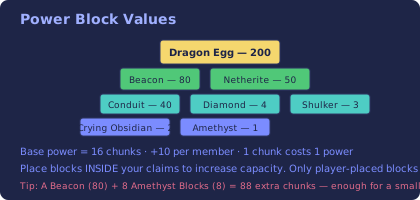
Section titled “Power System”Power determines how many chunks your realm can claim. It’s the core resource of Realms.
| Source | Power Value |
|---|---|
| Base power | 16 chunks |
| Per member | +10 chunks |
| Per claimed chunk | -1 chunk (cost) |
Power Blocks
Section titled “Power Blocks”Place special blocks inside your claims to increase your realm’s power capacity:
| Block | Power per Block |
|---|---|
| Dragon Egg | 200 |
| Beacon | 80 |
| Netherite Block | 50 |
| Conduit | 40 |
| Diamond Block | 4 |
| Shulker Box | 3 |
| Crying Obsidian | 2 |
| Amethyst Block | 1 |
Only player-placed blocks count. Naturally generated terrain doesn’t give power.
Claiming Land
Section titled “Claiming Land”/realm claimClaims the single chunk you’re standing in.
/realm claim <diameter>Claims a square area centered on you. Diameter must be odd:
| Diameter | Chunks | Confirm Required? |
|---|---|---|
| 1 | 1 | No |
| 3 | 9 | No |
| 5 | 25 | Yes |
| 7 | 49 | Yes |
Confirmation expires after 30 seconds.
/realm unclaimUnclaims the current chunk, refunding power. If your realm home was in that chunk, it gets cleared.
Members & Roles
Section titled “Members & Roles”| Command | Description |
|---|---|
/realm invite <player> | Invite someone (expires in 60s) |
/realm join <realm> | Accept an invitation |
/realm kick <player> | Remove a member |
/realm promote <player> | Promote to Assistant |
/realm demote <player> | Demote to Resident |
/realm transfer <player> | Transfer ownership (Mayor) |
Role Titles
Section titled “Role Titles”You can customize titles for each role:
/realm title mayor <title>/realm title assistant <title>/realm title resident <title>/realm sethome [name]/realm home [name]/realm delhome <name>/realm homes- Every realm gets a default home for free
- Each additional named home costs 50 power to unlock
- Teleport has a 3-second warmup — don’t move or take damage
- 60-second cooldown between teleports
Diplomacy
Section titled “Diplomacy”| Command | Description |
|---|---|
/realm ally <realm> | Request/accept alliance |
/realm enemy <realm> | Declare war |
/realm neutral <realm> | Request neutrality |
/realm allies | List allies |
/realm enemies | List enemies |
/realm relations | Show all relations |
Alliance Benefits
Section titled “Alliance Benefits”- Friendly-fire immunity in allied territory
- Allies can open containers and use workstations (by default)
- Ally spawn access is disabled by default
Overclaiming (Raids)
Section titled “Overclaiming (Raids)”If a realm’s power drops below their claimed chunks, their land becomes weakened:
- Enemy realms can
/realm overclaimthose chunks - Must stand on the chunk for 10 minutes to complete the overclaim
- Cannot redeclare war on the same realm for 1 hour after going neutral
Explosions in Claims
Section titled “Explosions in Claims”| Type | Behavior |
|---|---|
| TNT | Vanilla (blocks break) |
| Creeper | Cancelled |
| End Crystal | Cancelled |
| Respawn Anchor | Cancelled |
| Bed (Nether/End) | Cancelled |
| Wither | Cancelled |
| Ghast Fireball | Cancelled |
Peaceful realms force “cancelled” for ALL explosion types.
Realm Flags
Section titled “Realm Flags”| Flag | Default | Description |
|---|---|---|
hostile-spawn | true | Hostile mobs spawn in claims |
passive-spawn | true | Passive mobs spawn in claims |
mob-griefing | false | Creepers/Endermen grief |
pvp | true | Player combat in claims |
/realm flag <flag> <true|false>Realm Chat
Section titled “Realm Chat”/realmchat <message>Sends a message only to your realm members. Alias: /rc
Format: [Realm] Role Name: message
Display & Visuals
Section titled “Display & Visuals”| Command | Description |
|---|---|
/realm display | Toggle claim border titles |
/realm togglebar | Toggle boss bar power display |
/realm showclaim | Toggle particle outline of claims |
/realm map | ASCII map of nearby claims |
When entering a claim, you’ll see:
- A title showing the realm name
- An action bar with realm info
- Optional sounds and particles
Other Commands
Section titled “Other Commands”| Command | Description |
|---|---|
/realm info [realm] | Show realm info |
/realm here | Show which realm owns this chunk |
/realm who <player> | Show which realm a player belongs to |
/realm list | List all realms |
/realm top | Top realms by power |
/realm power | Check your realm’s power |
/realm rename <name> | Rename your realm |
/realm disband | Delete your realm (requires confirm) |
/realm reload | Admin: reload config |
- Power is everything — recruit members and place power blocks to expand
- Claim strategically around valuable resources
- Don’t over-extend — claiming more than you can defend makes you vulnerable
- Use
/realm mapfrequently to understand territorial boundaries - Alliances are crucial for surviving against larger realms
- Set multiple homes for fast travel between distant claims